
BlackHole vs Spotify 2026 – Features, Comparison & Best Pick
In today’s fast-paced world, music is no longer just a hobby—it’s part of our daily routine. Whether you’re commuting, working, exercising, or simply relaxing, a good music streaming app can make every moment better. Among the countless options available, Spotify has been a global leader for years, known for its massive library, personalized playlists, and cross-device compatibility.
On the other hand, BlackHole is a rising star in the streaming world. Loved for its ad-free experience, high-quality audio, and completely free access, it’s quickly becoming a favorite alternative for music lovers who want premium features without the price tag.
In this guide, we’ll put BlackHole vs Spotify head-to-head, breaking down their features, sound quality, pricing, usability, and limitations so you can decide which app is the best fit for your music needs in 2026.
What is BlackHole?
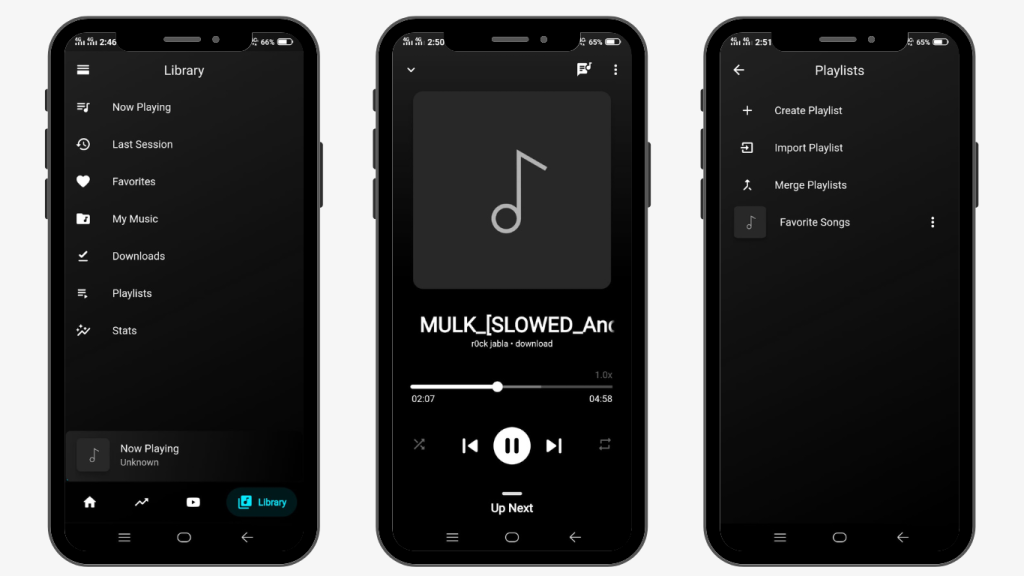
BlackHole is a free music streaming app that gives you premium features without any subscription fees. You can listen to songs in high-quality sound, enjoy ad-free playback, and even download tracks to play offline. It’s open-source, which means it’s built for users who value privacy and freedom. BlackHole Music App is lightweight and easy to use and lets you create and manage your playlists your way. Whether you want the latest hits or hidden gems, BlackHole makes it simple to enjoy music anywhere.
What is Spotify?
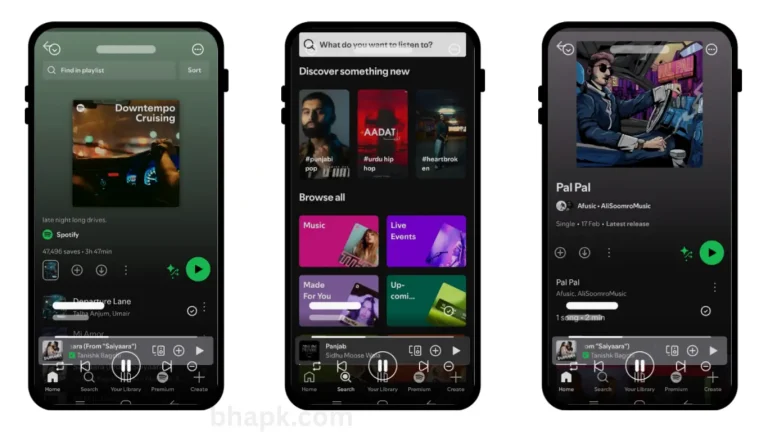
Spotify is one of the most popular music streaming platforms in the world. It has millions of songs, albums, and podcasts from artists across the globe. Spotify offers two versions—a free plan with ads and a premium plan that removes ads, allows offline listening, and improves sound quality. It’s known for its smart music suggestions and playlists that match your taste. If you want a well-organized, easy-to-use app with endless music choices, Spotify is the best pick.
BlackHole vs Spotify Features Comparison
If you’re trying to decide between BlackHole and Spotify, you’ll notice that while both offer the best music streaming experiences, they cater to different needs. Below is a simple, clear comparison to help you pick the one that fits your style.
Playlist & Favorites
- BlackHole—Lets you create custom playlists and mark songs, albums, or podcasts as favorites for quick access. You can also import playlists from other music apps.
- Spotify—Allows you to build and organize playlists but does not support direct playlist importing.
Device Compatibility
- BlackHole—Works best on Android devices. It can run on PC or Mac with the help of an Android emulator.
- Spotify—Available on Android, iOS, Windows, Mac, smart TVs, and even wearables without extra setup.
Import Playlist Support
- BlackHole—Supports importing playlists from other platforms like Spotify, YouTube Music, and Gaana.
- Spotify—Does not offer built-in import tools.
Ads & Pricing
- BlackHole is 100% free and ad-free, with no subscription required.
- Spotify—The free plan includes ads; an ad-free experience is available with a paid subscription.
Offline Playback
- BlackHole lets you download and save songs directly to your device for offline use at no cost.
- Spotify—Offline downloads are only available in the Premium version.
Voice Control
- BlackHole—Does not have built-in voice assistant integration.
- Spotify—Works with smart speakers and voice assistants like Alexa and Google Assistant.
Music Library Size
- BlackHole—Access over 100 million songs, including many regional and independent tracks.
- Spotify is one of the largest music libraries in the world with global licensing deals.
User Interface & Customization
- BlackHole—Modern, minimal, and customizable with themes, colors, and font adjustments.
- Spotify—Sleek, branded interface with a consistent look across devices, but limited customization.
Search & Discovery
- BlackHole—Search by song, album, artist, or genre with fast results.
- Spotify – Advanced search plus AI-powered music recommendations.
Sleep Timer
- BlackHole—A fully adjustable sleep timer that stops playback after your set time.
- Spotify—Sleep timer with fixed time options.
Pros & Cons
| BlackHole | Spotify |
| ✅ Free and ad-free | ✅ Huge licensed music library |
| ✅ High-quality audio (320 kbps) for all | ✅ Works on almost every device |
| ✅ Offline downloads without subscription | ✅ Podcasts and exclusive shows |
| ✅ Playlist import from other platforms | ✅ Reliable official support |
| ❌ Not available on Play Store or App Store | ❌ Ads in free plan |
| ❌ Limited official support | ❌ Offline listening only in Premium |
BlackHole vs Spotify FAQ’s
Is BlackHole safe to use?
Yes, BlackHole is an open-source project. Download it only from trusted sources to ensure safety.
Does Spotify offer free offline listening?
No, offline listening is only available with Spotify Premium.
Can I import my Spotify playlists into BlackHole?
Yes, BlackHole allows playlist import from Spotify, YouTube, and JioSaavn.
Which has better audio quality?
Both offer 320 kbps in premium mode, but BlackHole gives 320 kbps for free.
Which is better for 2026?
Choose BlackHole APK for free, ad-free, high-quality music. Go with Spotify Premium for an official, feature-rich platform.
BlackHole vs Spotify Conclusion:
BlackHole Music App is perfect for those seeking a free, ad-free music streaming experience with offline playback. Spotify offers a massive library, smart recommendations, and seamless cross-device support. Choose BlackHole APK for premium features at no cost, or Spotify for a polished, global music platform. In 2026, both deliver the best music—it’s all about your priorities.
Download BlackHole for Android, iOS & PC – Easy Setup Guide
Want to use BlackHole on your device? You can download the BlackHole APK for Android, get BlackHole for iOS, or install BlackHole on your PC. Follow our simple guides and start enjoying your favorite songs right away.